【AI工具箱】Firecrawl:AI时代爬虫,网站自动转LLM数据
Firecrawl 是什么?
想象一下,你想让 AI 学习某个网站的内容(比如公司文档、产品介绍、技术教程),但网页上有很多广告、导航栏、侧边栏等无关内容。传统的网页爬虫会把这些乱七八糟的东西都抓下来,AI 看了会"消化不良"。
Firecrawl 就像是一个"智能清洁工":
- • 🕷️ 智能爬取:自动访问网站,抓取所有页面内容
- • 🧹 自动清洁:去除广告、导航栏等无关内容,只保留核心文字
- • 📝 格式转换:将网页转成干净的 Markdown 或 JSON 格式
- • 🤖 AI 友好:输出的数据可以直接喂给 ChatGPT、Dify 等 AI 工具
使用场景:
- • 📚 为 AI 客服准备知识库(爬取公司文档、FAQ)
- • 📰 定期抓取新闻、文章用于分析
- • 🛒 监控竞品网站的产品信息
- • 📖 批量下载在线教程转成 Markdown 笔记
简单来说:专为 AI 应用设计的网页爬虫,能将任意网站快速转化为干净、结构化的数据,让 AI 能更好地理解和学习。
官方文档
完整的使用教程请参考:https://docs.firecrawl.dev/zh/introduction
本地部署教程
为什么要本地部署?
- • 💰 免费使用:不需要购买官方的 API 额度
- • 🔒 数据安全:爬取的数据保存在本地,不泄露
- • ⚡ 无限制:想爬多少就爬多少
前提条件: 确保你已经安装了 Docker(查看安装教程[1])
第一步:下载代码
  # 克隆 Firecrawl 仓库
git clone https://github.com/mendableai/firecrawl.git

# 进入项目目录
cd firecrawl/apps/api
第二步:修改配置
1. 修改端口(可选)
如果默认端口被占用,可以修改成其他端口。
文件位置: docker-compose.yml
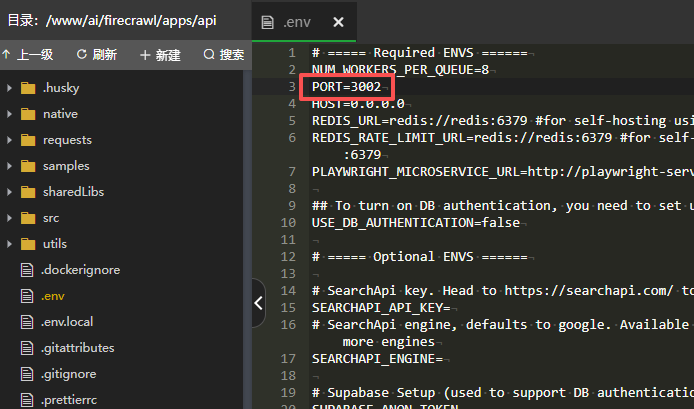
2. 关闭授权验证(推荐)
作用: 本地使用时不需要 API Key,更方便。
配置方法:
在 .env 文件中添加:
  # 关闭授权验证
USE_DB_AUTHENTICATION=false
3. 设置 Go 代理(可选,国内用户推荐)
作用: 加速 Go 依赖包的下载,避免构建时卡住。
配置方法:
在 Dockerfile 中找到安装 Go 依赖的部分,添加代理配置:
  # Install Go dependencies and build parser lib
RUN cd /app/sharedLibs/go-html-to-md && \
    go env -w GOPROXY=https://goproxy.cn && \
    go mod tidy && \
    go build -o libhtml-to-markdown.so -buildmode=c-shared html-to-markdown.go && \
    chmod +x libhtml-to-markdown.so
第三步:启动服务
  # 确保在 firecrawl/apps/api 目录下
cd firecrawl/apps/api

# 启动 Firecrawl
docker compose -p firecrawl up -d
说明:
- •
-p firecrawl:项目名称 - •
-d:后台运行
访问地址: 启动成功后,服务运行在 http://localhost:3002(默认端口)
停止服务
docker compose -p firecrawl down常见问题解决
问题:构建时出现 SSL 错误或依赖下载失败
现象: 运行 docker compose up 时报错:
  SSL error: unknown error; class=Ssl (16)
error: failed to get `nodesig` as a dependency
failed to load source for dependency `nodesig`
原因:
- • 网络问题导致无法从 GitHub 下载依赖包
- • SSL 证书验证失败
- • 国内访问 GitHub 不稳定
解决方法:使用镜像源和优化网络配置
需要替换 apps/api/Dockerfile 文件的内容,使用国内镜像加速。
完整的 Dockerfile 配置(已优化,直接复制替换):
  # syntax=docker/dockerfile:1
FROM node:22-slim AS base
ENV PNPM_HOME="/pnpm"
ENV PATH="$PNPM_HOME:$PATH"
ENV CI=true
RUN corepack enable

# ===== 构建 Go 共享库 =====
FROM golang:1.24 AS go-build
WORKDIR /app
COPY sharedLibs/go-html-to-md ./sharedLibs/go-html-to-md
# 使用国内 Go 代理加速下载
RUN cd /app/sharedLibs/go-html-to-md && \
    go env -w GOPROXY=https://goproxy.cn && \
    go mod tidy && \
    go build -o libhtml-to-markdown.so -buildmode=c-shared html-to-markdown.go && \
    chmod +x libhtml-to-markdown.so

# ===== 构建应用 =====
FROM base AS build
WORKDIR /app

# 安装系统依赖(添加 ca-certificates 和 git 解决 SSL 问题)
RUN apt-get update && apt-get install -y \
    curl \
    build-essential \
    pkg-config \
    python3 \
    ca-certificates \
    git \
    && update-ca-certificates \
    && rm -rf /var/lib/apt/lists/*

# 安装 Rust
ENV RUSTUP_HOME=/usr/local/rustup \
    CARGO_HOME=/usr/local/cargo \
    PATH=/usr/local/cargo/bin:$PATH
RUN curl --proto '=https' --tlsv1.2 -sSf https://sh.rustup.rs | sh -s -- -y --no-modify-path \
    && chmod -R a+w $RUSTUP_HOME $CARGO_HOME

# 配置 Cargo 使用清华大学镜像源(加速下载)
RUN mkdir -p $CARGO_HOME && \
    echo '[source.crates-io]' > $CARGO_HOME/config.toml && \
    echo 'replace-with = "tuna"' >> $CARGO_HOME/config.toml && \
    echo '' >> $CARGO_HOME/config.toml && \
    echo '[source.tuna]' >> $CARGO_HOME/config.toml && \
    echo 'registry = "https://mirrors.tuna.tsinghua.edu.cn/git/crates.io-index.git"' >> $CARGO_HOME/config.toml && \
    echo '' >> $CARGO_HOME/config.toml && \
    echo '[net]' >> $CARGO_HOME/config.toml && \
    echo 'git-fetch-with-cli = true' >> $CARGO_HOME/config.toml && \
    echo 'retry = 10' >> $CARGO_HOME/config.toml

# 配置 Git 优化网络连接
RUN git config --global http.postBuffer 524288000 && \
    git config --global http.lowSpeedLimit 0 && \
    git config --global http.lowSpeedTime 999999 && \
    git config --global http.sslVerify true && \
    git config --global core.compression 0

# 设置 Cargo 和 Rust 环境变量
ENV CARGO_NET_RETRY=10 \
    CARGO_NET_GIT_FETCH_WITH_CLI=true \
    RUSTUP_DIST_SERVER=https://mirrors.tuna.tsinghua.edu.cn/rust-static \
    RUSTUP_UPDATE_ROOT=https://mirrors.tuna.tsinghua.edu.cn/rust-static/rustup

# 复制源文件
COPY pnpm-lock.yaml pnpm-workspace.yaml package.json ./
COPY . .

# 预先克隆 nodesig 仓库,使用多个备选镜像源(解决下载失败问题)
RUN mkdir -p /usr/local/cargo/git/db && \
    cd /usr/local/cargo/git/db && \
    (git clone --bare --depth 1 https://github.com/firecrawl/nodesig nodesig-e0a68ad4afa2e088 || \
     git clone --bare --depth 1 https://hub.nuaa.cf/firecrawl/nodesig nodesig-e0a68ad4afa2e088 || \
     git clone --bare --depth 1 https://gh.api.99988866.xyz/https://github.com/firecrawl/nodesig nodesig-e0a68ad4afa2e088 || \
     git clone --bare --depth 1 https://cors.isteed.cc/github.com/firecrawl/nodesig nodesig-e0a68ad4afa2e088 || \
     git clone --bare --depth 1 https://github.moeyy.xyz/https://github.com/firecrawl/nodesig nodesig-e0a68ad4afa2e088 || \
     (git config --global http.sslVerify false && \
      git clone --bare --depth 1 https://github.com/firecrawl/nodesig nodesig-e0a68ad4afa2e088 && \
      git config --global http.sslVerify true) || \
     echo "Warning: All mirrors failed, will try during build") && \
    chmod -R 777 /usr/local/cargo/git/db || true

# 安装依赖
RUN --mount=type=cache,id=pnpm,target=/pnpm/store \
    --mount=type=cache,target=/usr/local/cargo/registry \
    --mount=type=cache,target=/app/native/target \
    pnpm install --frozen-lockfile

# 构建应用
RUN pnpm run build

# 删除开发依赖
RUN pnpm prune --prod --ignore-scripts

# ===== 运行时环境 =====
FROM base AS runtime

# 安装运行时依赖
RUN apt-get update && apt-get install -y \
    git \
    procps \
    && rm -rf /var/lib/apt/lists/*

EXPOSE 8080
WORKDIR /app

# 复制构建产物
COPY --from=build /app/node_modules ./node_modules
COPY --from=build /app/dist ./dist
COPY --from=build /app/native ./native

# 复制 Go 共享库
COPY --from=go-build /app/sharedLibs/go-html-to-md/libhtml-to-markdown.so ./sharedLibs/go-html-to-md/

CMD ["node", "dist/src/harness.js", "--start-docker"]
配置说明:
- 1. Go 代理:使用
goproxy.cn加速 Go 包下载 - 2. Rust 镜像:使用清华大学镜像源加速 Rust 包下载
- 3. 多镜像源:配置了多个 GitHub 镜像,自动尝试可用的源
- 4. SSL 优化:安装 ca-certificates 解决证书问题
- 5. Git 优化:配置 Git 提高大文件下载成功率
使用方法:
- 1. 将上面的内容完整复制
- 2. 替换
apps/api/Dockerfile文件 - 3. 重新运行
docker compose -p firecrawl up -d
MCP 集成(与 AI 工具对接)
什么是 MCP?
MCP (Model Context Protocol) 是一个协议,让 AI 工具(如 Claude Desktop、Windsurf 等)可以直接调用 Firecrawl 的功能。
使用场景:
- • 在 Claude Desktop 中直接爬取网页内容
- • 在 AI 编程助手中获取在线文档
- • 让 AI 实时访问最新的网络信息
配置教程: https://docs.firecrawl.dev/zh/mcp-server
简单说明:
通过 MCP,你可以让 AI 助手在对话时自动爬取网页,不需要手动复制粘贴网页内容。比如你问 Claude:"帮我总结一下这个网页的内容 https://example.com",它就会自动调用 Firecrawl 爬取并分析。
使用示例
API 调用示例
抓取单个网页:
  curl -X POST http://localhost:3002/v1/scrape \
  -H 'Content-Type: application/json' \
  -d '{
    "url": "https://example.com"
  }'
抓取整个网站:
  curl -X POST http://localhost:3002/v1/crawl \
  -H 'Content-Type: application/json' \
  -d '{
    "url": "https://example.com",
    "limit": 100
  }'
提取结构化数据:
  curl -X POST http://localhost:3002/v1/scrape \
  -H 'Content-Type: application/json' \
  -d '{
    "url": "https://example.com",
    "formats": ["markdown", "html"]
  }'
总结
通过这篇教程,你应该已经掌握了:
- 1. ✅ Firecrawl 的核心功能:智能爬虫,将网页转换为 AI 友好的格式
- 2. ✅ 本地部署方法:使用 Docker 快速部署
- 3. ✅ 常见问题解决:网络问题、依赖下载失败的完整解决方案
- 4. ✅ API 使用方法:如何调用 Firecrawl 抓取网页
- 5. ✅ MCP 集成:如何与 AI 工具对接
下一步建议:
- • 查看 官方文档[2] 学习更多高级用法
- • 尝试爬取一些网站,为你的 AI 应用准备知识库
- • 探索 API 参数,定制化你的爬取需求
小提示:
- • 爬取网站时请遵守网站的 robots.txt 规则
- • 不要频繁爬取同一网站,避免给对方服务器造成压力
- • 个人学习使用没问题,商业用途请注意版权问题
祝你使用愉快!🎉
引用链接
[1] 查看安装教程: https://github.com/mendableai/firecrawl/blob/main/CONTRIBUTING.md#alternative-using-docker-compose
[2] 官方文档: https://docs.firecrawl.dev/zh/introduction